
The GNSS Compass was designed as a fully integrated GPS/INS navigation heading source, to be plug and play for NMEA 0183 and NMEA 2000 integrations, requiring no setup or configuration. There are some scenarios in which a user may want to configure the compass to output and log extra data such as ANPP packets. For this, Advanced Navigation has a GNSS Compass Manager found here: GNSS Compass
Configuring ANPP Input and Outputs
To connect with the GNSS Compass Manger the POE GNSS Compass will require a data port to be configured to send and receive ANPP packets.
To do this:
-
Connect to the GNSS Compass using a web browser.
-
Click "Configuration" → "Data Ports" as shown below.
If the IP address of the POE GNSS Compass is unknown please see, Finding the IP Address of Advanced Navigation Products
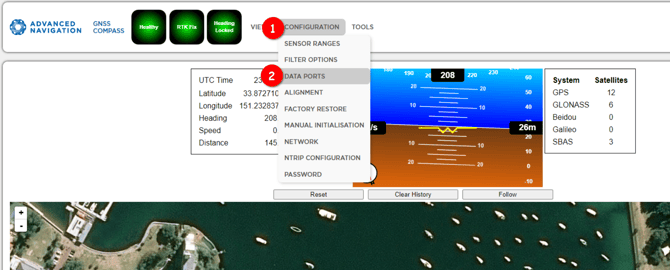
Configure one of the IP ports to "ANPP Input" and "ANPP Output".
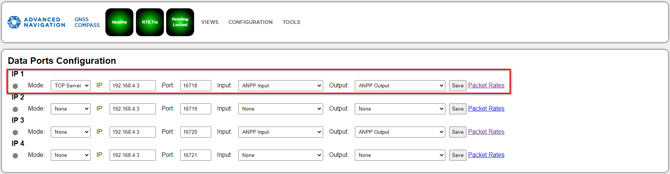
Note the IP address and Port number as these will be needed for connecting to the GNSS Compass Manager.
In the example below IP1 has been configured to send and receive ANPP packets with IP address 192.168.4.3 and port number 16718.
Setting Packets and Rates
The GNSS Compass Manager will request the "Configuration" and "Device Information" packets be sent. Apart from these packets the manager will only log ANPP packets that are configured to be sent from the Compass.
To set which packets will be sent from the Compass and at what rate. Inside of the browser or manager connection, click "Packet Rates" inside of Data Ports Configuration.
Set the Packet ID and Period required.